
How to Create Seasonal Product Images Without Repeated Photoshoots
Seasonal marketing plays an important role in e-commerce growth. From spring collections and summer promotions to autumn themes and winter celebrations, businesses regularly update their product visuals to match changing customer interests. However, arranging professional photoshoots for every seasonal campaign can require additional time, planning, equipment, and production expenses.
For online sellers managing hundreds of products across multiple marketplaces, repeating the photography process can become challenging. Fortunately, AI-powered image creation, professional photo editing, and existing product photography make it possible to develop fresh seasonal visuals without organizing a new photoshoot every time.
By combining existing product images with creative editing techniques, brands can maintain an attractive online presence while making their e-Commerce Marketing activities more efficient.
Why Seasonal Product Images Matter for E-Commerce
Product images influence how customers discover, understand, and evaluate products online. Seasonal visuals help brands connect their products with relevant shopping trends and create more engaging product presentations.
For example, a handbag can be displayed in a bright outdoor summer environment, while the same product can be presented in a warm indoor setting for a winter collection. Similarly, home décor products, accessories, gift bags, clothing, and lifestyle items can benefit from seasonal backgrounds and creative compositions.
Fresh imagery also helps businesses maintain visual consistency across Amazon, Walmart, eBay, Etsy, Shopify, and other online selling platforms.
Instead of producing completely new photographs for every campaign, businesses can build multiple creative variations from a reliable collection of original product images.
Use Existing Product Photography as Your Starting Point
The first step is to organize your existing product photography. Select high-resolution images that clearly show the product, its colour, shape, texture, materials, and important features.
Front-facing photographs, side angles, close-up details, and lifestyle images provide useful starting materials for creating different seasonal designs.
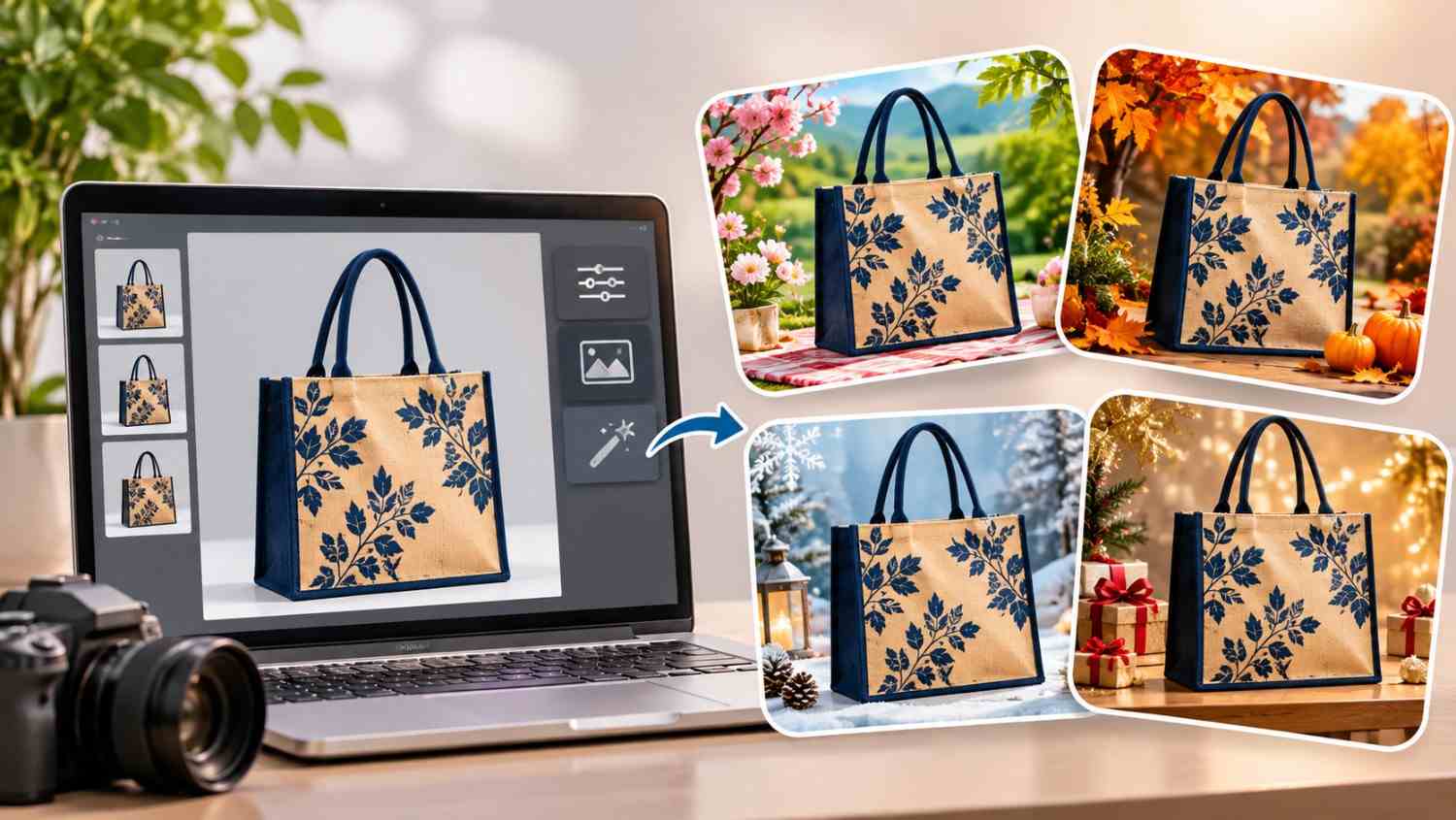
For example, an existing jute bag photograph can be transformed into a spring-inspired composition featuring flowers and natural greenery. A summer-themed version might use a bright outdoor background, while an autumn variation could include warm seasonal colours and decorative leaves.
The most important consideration is product accuracy. Any new visual should represent the actual product being sold. Its dimensions, design, colours, patterns, handles, stitching, and other identifying features should remain consistent.
Create Seasonal Backgrounds with AI Image Editing
AI-powered image editing has made seasonal creative development more flexible. Instead of arranging a complete photography setup, sellers can use existing product images to develop new backgrounds and visual environments.
AI tools can help create lifestyle settings, adjust backgrounds, improve lighting, and generate creative compositions.
For example, a single product image can inspire several visual concepts:
A spring collection might feature flowers, greenery, and natural daylight. A summer collection could use outdoor environments, bright colours, and beach-inspired settings. Autumn visuals may include warm lighting, earthy tones, and seasonal foliage. Winter-themed images can feature elegant indoor settings, soft lighting, and decorative elements.
However, AI-generated environments should complement the product rather than change its appearance. Always compare the final image with the original photograph to identify incorrect details, distorted patterns, unrealistic shadows, or unwanted design changes.
Develop Multiple Creative Variations from One Product Image
One of the biggest advantages of modern e-Commerce Photography is the ability to create several marketing assets from a single original photograph.
A suitable product image can be developed into lifestyle photography, seasonal promotional graphics, product feature visuals, social media creatives, advertising images, and enhanced product content.
For example, a fabric tote bag could be presented in a garden setting, a shopping environment, a travel-inspired scene, or a simple seasonal interior.
These variations allow businesses to test different creative approaches without repeatedly photographing the same item.
However, marketplace requirements should always guide the final image selection. The primary product image may have stricter requirements than secondary lifestyle and promotional images. Keep the main listing image compliant and use seasonal creative variations where the relevant platform permits them.
Maintain Consistent Branding Across Marketplaces
Creating attractive seasonal images is only one part of a successful visual strategy. Businesses should also maintain consistent product presentation across their online channels.
Use similar lighting, image quality, typography, colour balance, and visual styling throughout your product catalog. This creates a recognizable brand identity and makes product collections appear more organized.
When preparing images for Amazon, Walmart, eBay, Etsy, and Shopify, consider the image dimensions, file formats, background requirements, and content policies of each platform.
Mobile presentation is equally important. Product images should remain clear and visually appealing when customers browse listings on smaller screens.
A coordinated approach to Marketplace Management helps sellers organize creative assets, update listings, maintain catalog consistency, and manage seasonal campaigns across multiple channels.
Combine Seasonal Photography with SEO and AEO
Seasonal product images can become more valuable when supported by optimized product information.
Use relevant seasonal keywords naturally in product titles, descriptions, image filenames, and supporting website content wherever appropriate. Descriptive image alt text can also help search engines and accessibility tools understand the visual content.
For example, a product image showing a summer tote bag can use descriptive alt text explaining the product type, colour, and visible setting.
For GEO and AEO, clear product information, consistent terminology, structured content, and accurate descriptions help AI-powered search systems understand what a product offers.
Combining optimized product visuals with strong product descriptions, relevant keywords, and structured marketplace information creates a more complete e-commerce presentation.
How AMZ Northland Supports Seasonal E-Commerce Photography
AMZ Northland helps online sellers improve their product presentation and marketplace performance through professional creative and e-commerce solutions.
Its services include e-Commerce Photography, AI-powered product visuals, lifestyle imagery, infographics, A+ Content, listing optimization, catalog management, and advertising support.
Through e-Commerce Marketing, Marketplace Management, e-Commerce Photography, and Online Marketplace Services, AMZ Northland helps businesses develop consistent product presentations across Amazon, Walmart, eBay, Etsy, Shopify, and other selling platforms.
Whether you are preparing a new seasonal collection, refreshing existing product listings, or developing creative assets for upcoming marketing campaigns, AMZ Northland can help you explore more efficient ways to manage your e-commerce visuals.
Visit AMZ Northland to learn how professional photography, creative image development, and marketplace optimization can support your online business growth.
Recent Posts
- AI Product Photography for Walmart and eBay Listings
- How to Create Seasonal Product Images Without Repeated Photoshoots
- White Background vs Lifestyle Images: What E-Commerce Sellers Need
- How to Prepare Source Photos for AI Product Photography
- AI Product Photography for Home and Kitchen Products: A Complete Guide for E-Commerce Brands
- AI Product Photography for Fashion, Bags, and Accessories: A Complete Guide
- AI Product Photography for Beauty and Skincare Brands
- How to Make Consistent Product Images Across a Large Catalog
- AI Product Infographics: How to Highlight Features Clearly
Archives
- November 2026 (10)
- October 2026 (10)
- September 2026 (24)
- August 2026 (24)
- July 2026 (26)
- June 2026 (26)
- May 2026 (26)
- April 2026 (11)
- October 2025 (4)
- September 2025 (5)
Frequently Asked Questions
You can use existing high-quality product photographs with AI-powered background editing, image enhancement, and creative design tools to develop seasonal variations without arranging a new photoshoot.
Yes. AI tools can generate different environments, including spring gardens, summer outdoor settings, autumn scenes, and winter interiors. The original product appearance should remain accurate.
Yes, AI-assisted visuals can be useful for marketplace listings when they accurately represent the product and comply with the relevant platform’s image requirements. Primary images and secondary promotional images may have different rules.
The ideal number depends on the marketplace, product category, and available listing image slots. A useful image collection can include a primary product image, lifestyle visuals, close-up details, feature graphics, and seasonal variations.
Seasonal photography helps brands create relevant visual campaigns, refresh product presentations, support promotional activities, and communicate different product use cases to potential customers.
Yes, an original product photograph can serve as the starting point for multiple marketplace assets. However, images should be adapted to the dimensions, technical requirements, and content policies of each platform.
Yes. AMZ Northland offers e-Commerce Photography, AI-powered product visuals, listing optimization, A+ Content, catalog management, advertising support, and Marketplace Management to help businesses improve their online selling presence.
Recent Comments