
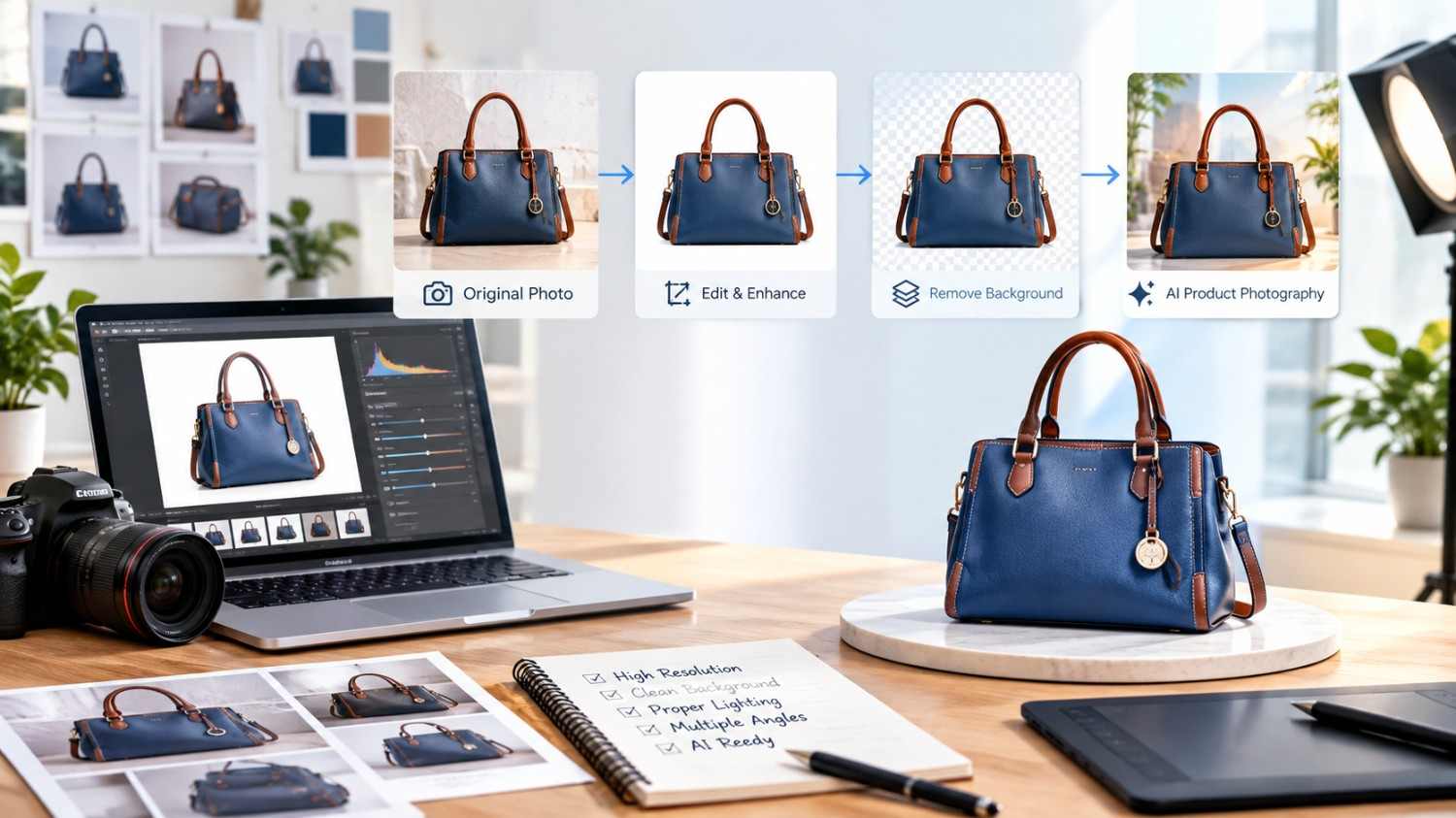
How to Prepare Source Photos for AI Product Photography
AI product photography is changing how e-commerce businesses create professional product images for online stores, marketplaces, and digital advertising. Instead of arranging a traditional photoshoot for every product, brands can use existing product photographs as source images and transform them into attractive lifestyle scenes, clean studio visuals, and marketing creatives with AI-powered tools.
However, the quality of the final AI-generated image depends significantly on the quality of the original photograph. A clear source image helps AI tools understand the product’s shape, colour, texture, material, and important features. Poor-quality photographs can lead to inaccurate details, distorted proportions, and unrealistic results.
For Amazon, Walmart, eBay, Etsy, and Shopify sellers, preparing suitable source photos is an important step towards creating consistent and professional product presentations.
Why Are Source Photos Important for AI Product Photography?
Source photos provide the visual foundation for AI product photography. AI tools use the original image to identify the product and generate new visual environments around it.
A well-prepared photograph helps maintain the product’s original appearance while allowing creative changes to the background, lighting, and surroundings.
For example, a simple photograph of a handbag can be transformed into a lifestyle image featuring a model, a modern interior, or an outdoor setting. Similarly, a product photograph of a storage basket can be enhanced with a home décor background.
The objective is to improve visual presentation without changing the actual product.
Choose High-Quality Original Product Images
Start with a clear, high-resolution photograph. The product should be completely visible, properly positioned, and sharply focused.
Avoid using blurry photographs, screenshots, heavily compressed images, or pictures with excessive shadows. These issues can make it difficult for AI tools to identify important product details.
For the best results, use original product photographs that show the complete item. Make sure the image has sufficient resolution for its intended marketplace or advertising placement.
Good source images should clearly communicate the product’s appearance without unnecessary visual distractions.
Use Proper Lighting and a Clean Background
Lighting plays an important role in preparing product photographs. Uneven lighting can create unwanted shadows, hide product details, or change the appearance of colours.
Use soft, balanced lighting to capture the product accurately. Natural daylight or professional studio lighting can help reveal material textures, stitching, patterns, and other details.
A simple white, grey, or neutral background is generally useful because it separates the product from surrounding objects.
For example, a jute bag photographed against a clean background allows AI tools to identify its natural texture, handle design, dimensions, and structure more clearly.
Capture Multiple Product Angles
One photograph may not communicate every important product feature. Taking multiple photographs from different angles provides additional visual information.
For bags and fashion accessories, useful views include the front, side, back, top, and close-up details. For home products, capture the shape, dimensions, surface texture, and functional features.
These additional images can help when creating different AI-generated product visuals. They also provide references for checking whether the final images accurately represent the original item.
Maintain consistency in lighting, distance, and camera positioning whenever possible.
Show Important Product Details Clearly
Before using AI photography tools, check whether the original photograph displays all important product features.
Pay particular attention to colours, patterns, logos, handles, zippers, stitching, material textures, and product proportions.
For example, if you are photographing a printed bag, the original pattern should be visible and sharply captured. If the product has leather trim, decorative embroidery, or special stitching, these features should be photographed clearly.
AI-generated backgrounds can improve presentation, but product identity should remain consistent. Avoid allowing AI to create additional pockets, change patterns, alter colours, or remove original features.
Remove Unnecessary Objects and Distractions
Unwanted objects can affect the quality of AI-generated product images. Before uploading source photographs, remove unnecessary props, packaging materials, cables, unrelated products, and other distractions.
Make sure the product is separated clearly from its surroundings.
Background removal can be useful when preparing product images for new lifestyle environments. However, check the edges carefully, especially around handles, straps, transparent elements, and fine product details.
The objective is to provide AI tools with a clean visual reference that makes the main product easy to identify.
Prepare Images According to Marketplace Requirements
Different e-commerce platforms have their own image requirements and presentation guidelines. Amazon, Walmart, eBay, Etsy, and Shopify may have different expectations for primary images, supporting images, lifestyle photography, and infographics.
Before generating or uploading final visuals, identify where the images will be used.
A primary product image may require a clean background, while supporting images can communicate product benefits, dimensions, materials, and everyday applications.
For sellers operating across Canada and the USA, consistent image preparation can help maintain a professional brand appearance across multiple marketplaces.
How Source Photos Support SEO, GEO, and AEO
Product photography also contributes to a wider digital marketing strategy.
SEO helps customers discover product pages through relevant search queries. GEO (Generative Engine Optimization) focuses on improving content visibility and understanding across AI-powered discovery platforms. AEO (Answer Engine Optimization) helps make product information easier for answer-based search systems to understand.
Businesses should use descriptive image filenames, relevant alt text, accurate product descriptions, and consistent product specifications.
For example, a descriptive image filename such as blue-jute-shopping-bag-front-view.jpg provides more useful context than a generic filename containing random characters.
AI photography should complement accurate product information rather than replace it. Clear images and consistent descriptions create a stronger product presentation for both customers and digital discovery platforms.
How AMZ Northland Helps Businesses with AI Product Photography
Preparing source images is only the beginning of a successful e-commerce visual strategy. Businesses also need professional image creation, optimized product listings, and consistent marketplace operations.
AMZ Northland helps e-commerce brands improve their product presentation through e-Commerce Marketing, Marketplace Management, e-Commerce Photography, and Online Marketplace Services.
Its AI-powered product photography services can transform existing product photographs into professional studio images, lifestyle visuals, product infographics, and marketplace-ready creative assets.
AMZ Northland also supports businesses selling through Amazon, Walmart, eBay, Etsy, and Shopify with listing optimization, A+ Content, catalog management, and marketplace consulting.
Whether you are launching new products, managing hundreds of SKUs, or improving existing product listings, preparing quality source photographs can help create more accurate and consistent visual content.
Recent Posts
- White Background vs Lifestyle Images: What E-Commerce Sellers Need
- How to Prepare Source Photos for AI Product Photography
- AI Product Photography for Home and Kitchen Products: A Complete Guide for E-Commerce Brands
- AI Product Photography for Fashion, Bags, and Accessories: A Complete Guide
- AI Product Photography for Beauty and Skincare Brands
- How to Make Consistent Product Images Across a Large Catalog
- AI Product Infographics: How to Highlight Features Clearly
- How to Keep Product Appearance Accurate in AI-Generated Images
- AI Product Photography for Small Businesses on a Budget
Archives
- November 2026 (8)
- October 2026 (10)
- September 2026 (24)
- August 2026 (24)
- July 2026 (26)
- June 2026 (26)
- May 2026 (26)
- April 2026 (11)
- October 2025 (4)
- September 2025 (5)
Frequently Asked Questions
Source photos are original product photographs uploaded into AI photography tools. They provide visual references for generating new backgrounds, lifestyle scenes, and professional product images while maintaining the product’s original appearance.
High-resolution, sharply focused photographs with balanced lighting and clearly visible product details are generally best. The required resolution depends on the intended use and marketplace specifications.
AI tools can unintentionally change product details. Always review the generated images to ensure that colours, patterns, dimensions, materials, logos, and other original features remain accurate.
A clean background can make product identification easier. Background removal is useful when the original surroundings are distracting, but it is not necessary for every AI photography workflow.
The number depends on the product and the desired output. One clear photograph may be sufficient for a simple visual transformation, while multiple angles and close-ups provide better references for detailed products.
Yes, AI-assisted images can be prepared for marketplace listings when they comply with the relevant platform’s image policies. Always check the latest requirements and ensure that the visuals accurately represent the actual product.
Yes. AMZ Northland provides AI-powered e-commerce photography solutions for brands targeting customers in Canada and the USA. Services include lifestyle images, studio visuals, product infographics, and marketplace-ready creative assets.
Recent Comments